Documentation
Everything you need to know to run Dumpling with confidence. If something is missing, email support.
How it works
A Dumpling backup job connects one database to one storage destination on a schedule. When a job is due, our worker opens a connection to your database, runs the native dump tool, and streams the output through memory directly into your bucket using S3 multipart upload. No temporary files are created and we do not retain a copy.
- PostgreSQL:
pg_dump --format=custom --no-owner --no-acl. Custom format is compressed and restorable selectively withpg_restore. - MySQL / MariaDB:
mysqldump --single-transaction --quick --routines --triggers, gzipped.
Objects are named by UTC timestamp inside a folder per job, for example backups/production-db/2026-09-10T02-00-01Z.dump, so they sort chronologically in any bucket browser.
Connecting a database
Your database must be reachable from the public internet from our worker's IP address:
2.28.121.200
Allow-list that address in your provider's firewall or trusted-sources list. We recommend a dedicated read-only user:
-- PostgreSQL
CREATE ROLE dumpling LOGIN PASSWORD 'strong-password';
GRANT CONNECT ON DATABASE app TO dumpling;
GRANT USAGE ON SCHEMA public TO dumpling;
GRANT SELECT ON ALL TABLES IN SCHEMA public TO dumpling;
GRANT SELECT ON ALL SEQUENCES IN SCHEMA public TO dumpling;
ALTER DEFAULT PRIVILEGES IN SCHEMA public GRANT SELECT ON TABLES TO dumpling;

-- MySQL
CREATE USER 'dumpling'@'%' IDENTIFIED BY 'strong-password';
GRANT SELECT, SHOW VIEW, TRIGGER, LOCK TABLES, EVENT ON app.* TO 'dumpling'@'%';
-- Only if you want stored procedures/functions in the dump (otherwise they are skipped with a note):
GRANT SHOW_ROUTINE ON *.* TO 'dumpling'@'%';          -- MySQL 8.0.20+
GRANT SELECT ON mysql.proc TO 'dumpling'@'%';         -- MariaDB and MySQL 5.7
Platform-specific instructions for Railway, Render, Supabase, Neon, Fly.io, Heroku, DigitalOcean, Hetzner, RDS and PlanetScale are in the guides.
Storage destinations
Any S3-compatible object store works. Create credentials that are scoped to one bucket with permission to put, get, list and delete objects. Retention needs delete permission; if you prefer to manage retention with bucket lifecycle rules, set "keep last" to 0 and grant write-only access.
Cloudflare R2 in five minutes
R2 is the storage we recommend when you have no bucket yet: the first 10 GB a month are free and there is no egress charge, so restores cost nothing. You need a Cloudflare account; the free plan is enough.
- In the Cloudflare dashboard open R2 Object Storage and click Create bucket. Name it something like
db-backups, leave the location on Automatic, create it.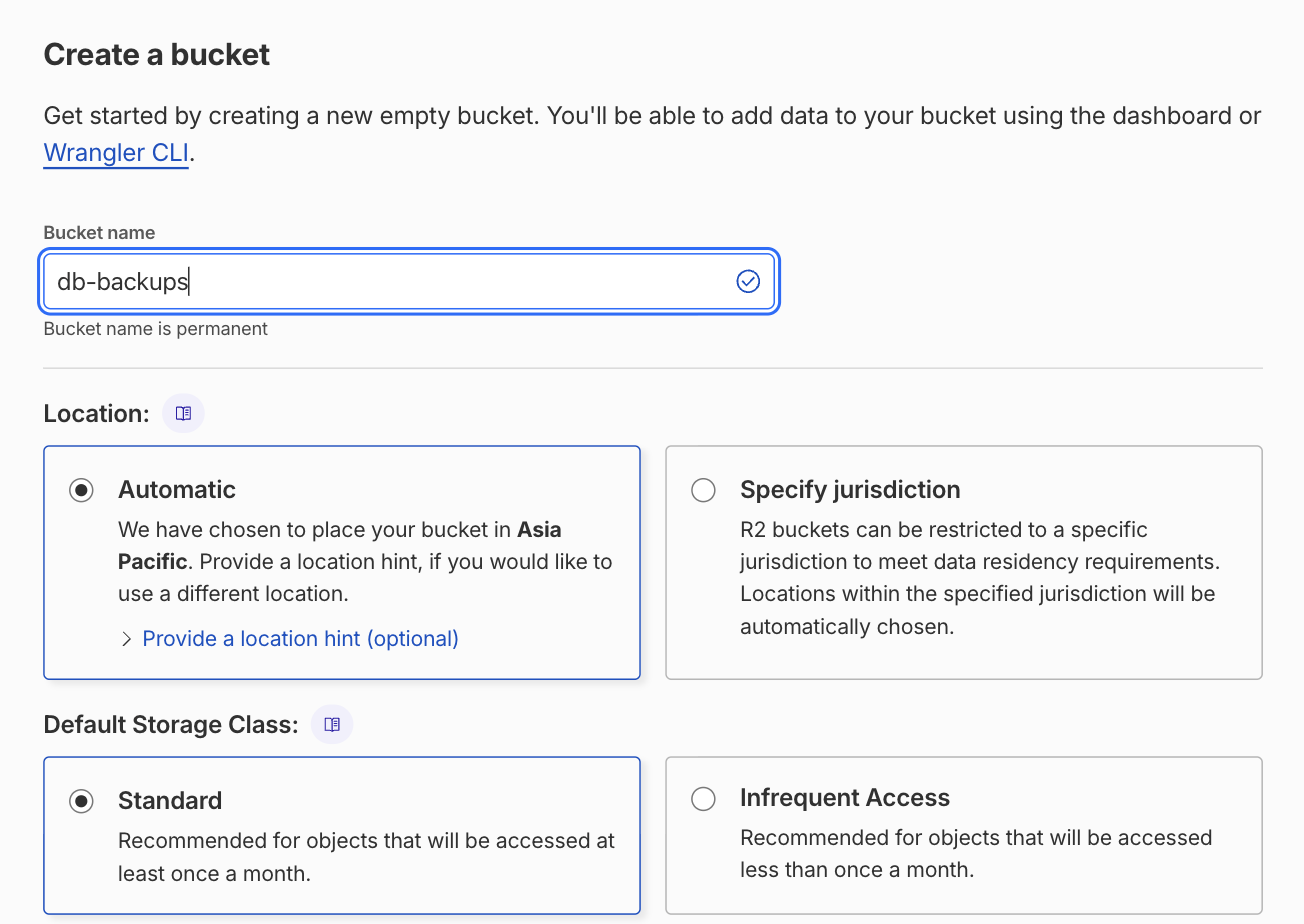
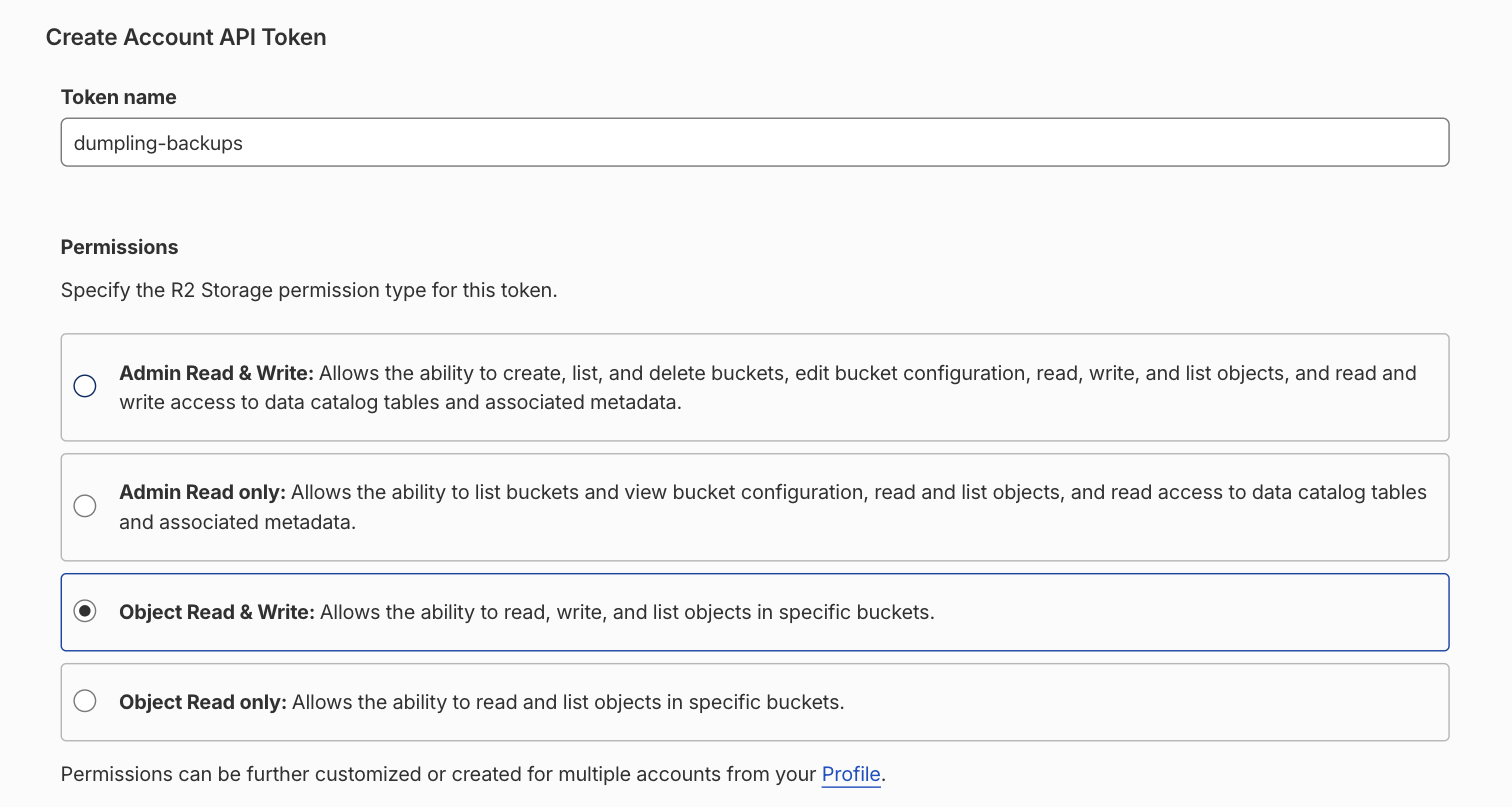
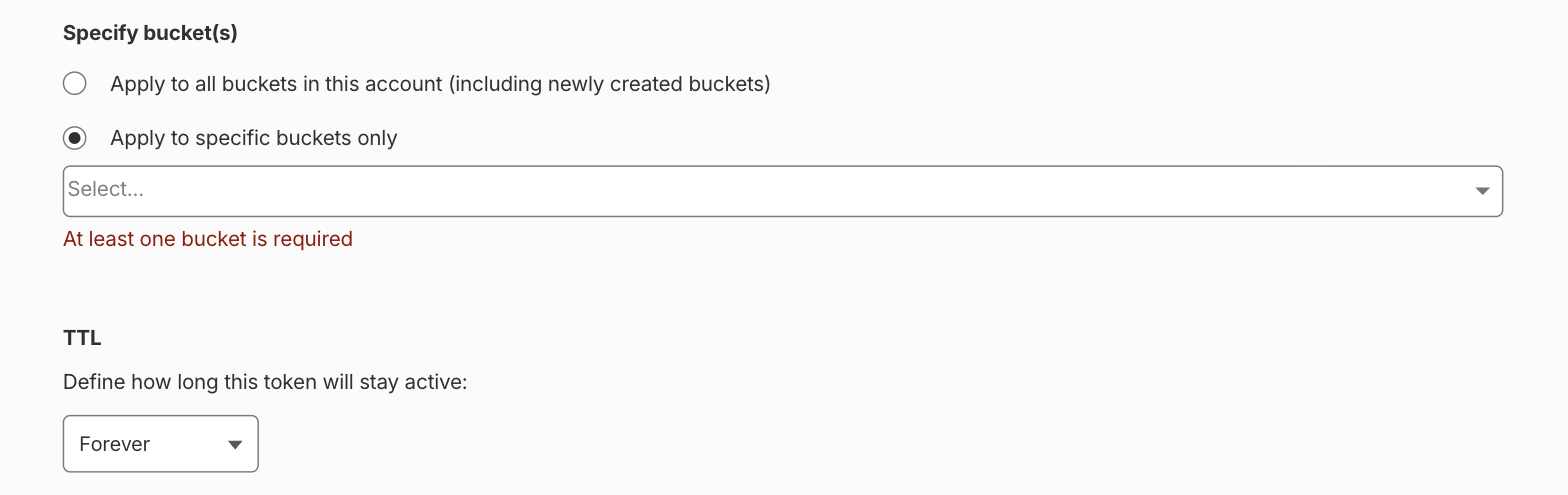
- Go back to the R2 overview and open Manage R2 API Tokens → Create API token. Permissions: Object Read & Write. Under "Specify bucket(s)" pick the bucket you just created, nothing else. TTL: forever, or a date you will remember to rotate. Create it.
- Cloudflare shows the Access Key ID, the Secret Access Key and the S3 endpoint,
https://<accountid>.r2.cloudflarestorage.com, once. Keep the tab open. - In Dumpling, Storage → Add storage → preset Cloudflare R2. Paste the bucket name, the endpoint, the two keys; region stays
auto. The connection test writes and deletes one small object, so a wrong token fails here, not at 02:00.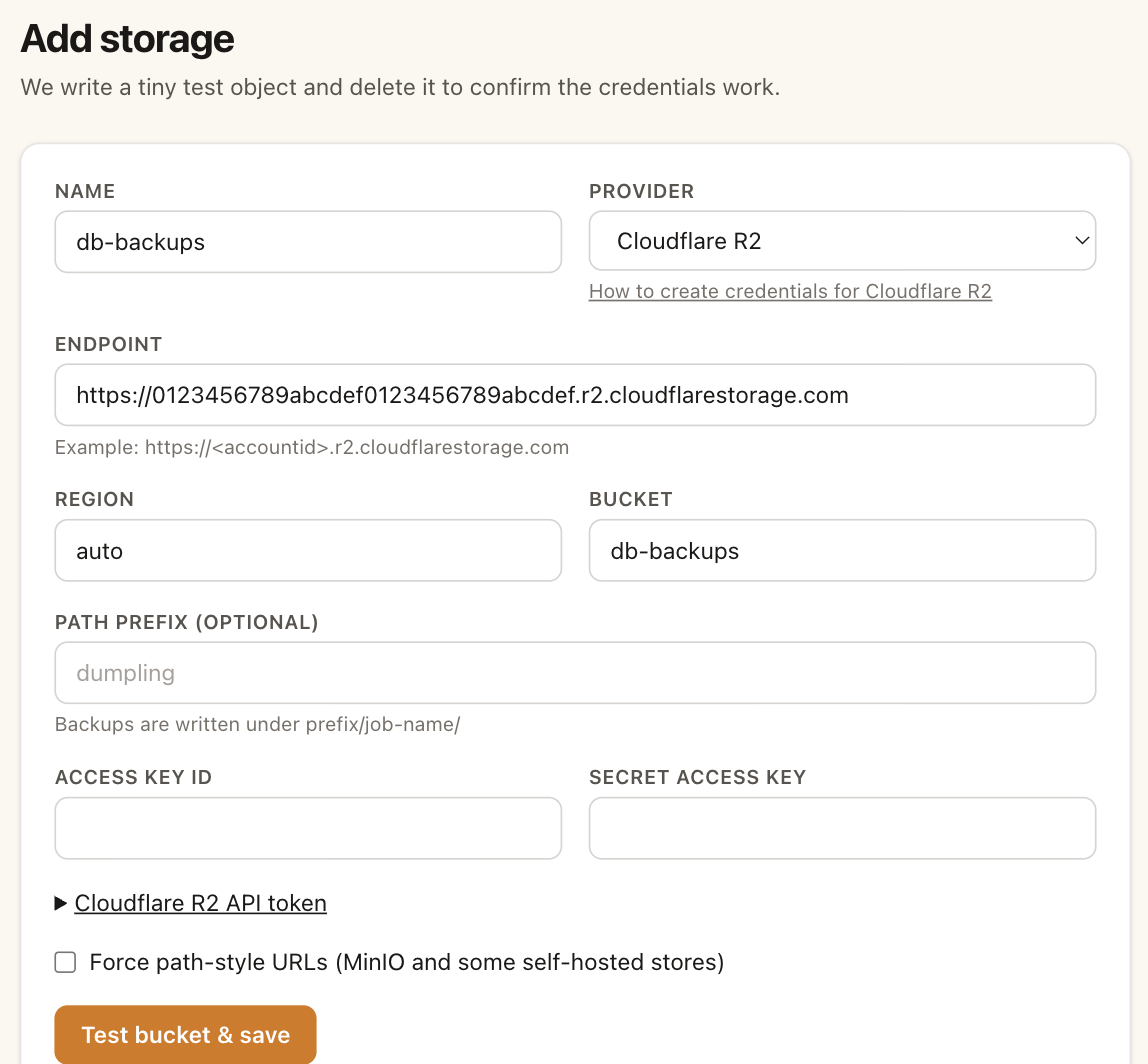
The token can only touch that one bucket. Everything else in your Cloudflare account stays out of reach, which is the point of scoping it.
Restoring
Restore on purpose before you have to: the restore drill checklist is one page.
PostgreSQL
# download the file from your bucket, then:
createdb restored_db
pg_restore --no-owner --no-acl -d restored_db 2026-09-10T02-00-01Z.dump

# inspect contents without restoring:
pg_restore --list 2026-09-10T02-00-01Z.dump
Use a pg_restore from PostgreSQL 18 or newer: the archives are written by an 18 client, and an older pg_restore refuses them with "unsupported version in file header". On macOS brew install postgresql@18; otherwise the postgres:18 Docker image has one.
MySQL
mysql -e "CREATE DATABASE restored_db"
gunzip < 2026-09-10T02-00-01Z.sql.gz | mysql restored_db
Dumps are taken with the MariaDB client, which works against MySQL 5.7, 8.x and MariaDB. If an old mysql client rejects the first line of the file (the MariaDB sandbox-mode comment), drop it:
gunzip < 2026-09-10T02-00-01Z.sql.gz | sed '1{/999999/d}' | mysql restored_dbEncrypted backups
If a job has a passphrase, files end in .enc and are encrypted with AES-256-CBC in OpenSSL's standard format. You do not need Dumpling to decrypt them:
openssl enc -d -aes-256-cbc -pbkdf2 -in backup.dump.enc -out backup.dump -pass pass:'your-passphrase'
We cannot recover a lost passphrase. Store it in your password manager.
Alerts
Failures always email the notification address on your account. Every plan, Free included, can also post to a Slack or Discord channel: paste the incoming-webhook URL under Alerts. Any other HTTPS endpoint receives the same JSON payload; it includes a text field, so Slack and Discord render it directly. Successful runs can optionally notify too.
Security
- Database passwords, storage secrets, passphrases and webhook URLs are encrypted at rest with AES-256-GCM using a master key that exists only in the server processes' environment, never in the database or the repository.
- Secrets are decrypted in memory only for the connection test and the backup run, and never logged. Run logs remove the user name from the command and never contain passwords.
- Backup data is streamed, never written to our disks, and never retained.
- TLS to your database is on by default; the server certificate is not verified (most managed providers use self-signed certificates). Prefer an IP allow-list over relying on TLS alone.
- Optional openssl-compatible encryption means even your bucket provider cannot read the contents. Available on every plan.
- Deleting a database or storage entry removes its credentials from the live database immediately; disaster-recovery copies of our database (secrets inside them remain encrypted) are limited to the last 7 nightly copies.
The full picture, including what we never store and how to report a vulnerability, is on the security page.
Restore verification
While a backup streams, the dump the tool produced is checked before compression and encryption: for PostgreSQL, pg_restore --list must read the archive and list its contents; for MySQL, the dump must carry mysqldump's completion trailer. A run shows "verified" when that passed. When it does not, the run fails and you get the usual failure alert: an archive the restore tool rejected is deleted, like a dump that died, and no older backup is deleted on that run. If our side could not run the check at all, the file is kept and the alert says so. An empty database is a valid archive with nothing in it and counts as verified. It proves the dump tool emitted a complete, well-formed archive that the standard tools accept; it does not restore it into a database and does not re-read the uploaded object, so do your own restore drill occasionally.
Limits
Each plan has a maximum database size per backup (measured before every run) and a minimum schedule interval. Runs exceeding the limit fail with a clear message rather than silently producing a partial backup.
FAQ
Does Dumpling support MongoDB, Redis or SQLite?
No. Dumpling backs up PostgreSQL and MySQL/MariaDB only.
Can I back up multiple databases on one server?
Yes — add each database separately. Each counts as one job.
My database is only reachable inside a private network.
Expose it through an SSH tunnel host, a Tailscale Funnel, or a Cloudflare Tunnel with the worker IP allow-listed. Dumpling does not open SSH tunnels itself.